The private PDF editor for Mac.
Typemark edits, signs, redacts, and OCRs on your Mac's hardware and nowhere else. No cloud, no account, no telemetry.
Thanks! We'll send you a TestFlight invite shortly.
Something went wrong. Please try again.
Security properties
Not policies that can change with an update. Constraints built into the architecture.
What never leaves your Mac
Your tax return.
Your medical diagnosis.
The NDA naming your client.
That passport scan.
There is no server behind Typemark. Documents cannot leak from a place they never go.
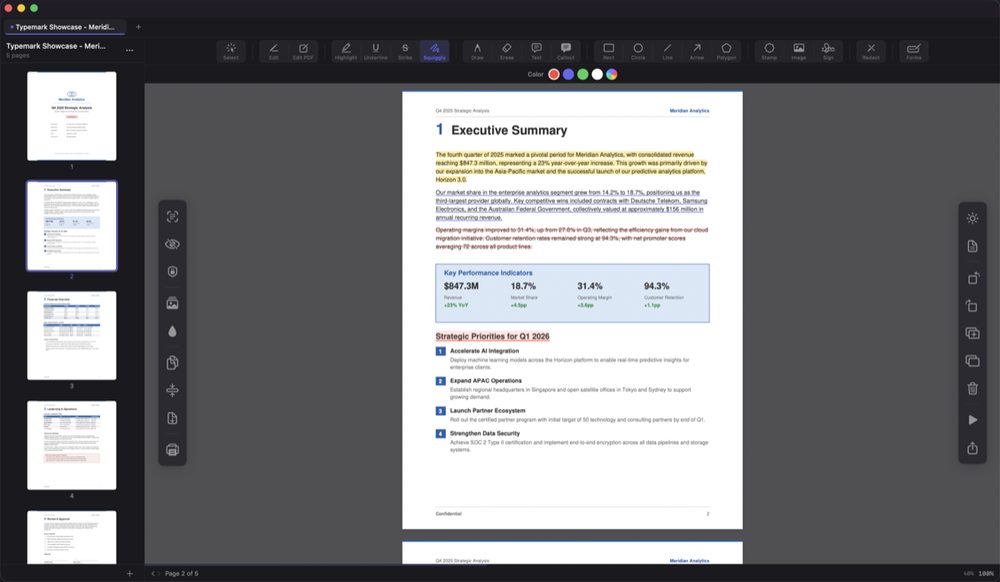
Twenty-one tools
Everything a working document demands, available offline from day one.
Annotate & review
- Annotate
- Highlight
- Underline & strike
- Callouts
- Stamps
- Draw
- Shapes
Edit & create
- Edit text
- Fill forms
- Form designer
- Sign
- Watermark
- Measure
- OCR
Organize & protect
- Merge
- Split
- Compress
- Organize pages
- Batch process
- Password protect
- Redact
Three commitments
Local by architecture
Every operation runs on your hardware. Privacy here is not a policy we promise to follow. It is a limitation we built on purpose.
Nothing collected
No analytics, no telemetry, no account. We cannot see your documents, and we cannot be compelled to hand over what we do not have.
Native or nothing
Typemark runs on its own PDF engine, written in Swift and tuned for Apple silicon. No web views, no wrappers, no borrowed code handling your files.
From the developer
I built Typemark because I did not want to upload a signed NDA to someone else's server just to highlight a paragraph.
If you handle documents that matter, Typemark treats them the way you already do: carefully, on your own machine, and nowhere else.
Join the beta
Typemark is free during the beta. Your feedback shapes 1.0.
Thanks! We'll send you a TestFlight invite shortly.
Something went wrong. Please try again.
macOS 14 Sonoma or later. Delivered via TestFlight.